ScreenShade

ScreenShade
License:
Free
Language:
English
Developer:
Developer's website
OS:
Mac OS X
Added:
See detailed info

Softonic review

Cyril Roger

“Dim your screen”

by Cyril Roger about ScreenShade

I didn't really think you could find something better than the Apple brightness tool, yet ScreenShade is significantly more powerful.

With this application, you can easily darken your screen completely or make it really bright.

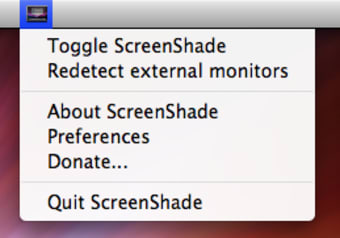
The program is accessible from the menu bar and pressing 'toggle ScreenShade' adjusts brightness according to the level of light in the room.

Press 'Redetect external monitors' to reset it and get a new brightness level. I wasn't all convinced by the level of light that ScreenShade chose though as most of the time it simply was too dim to work properly.

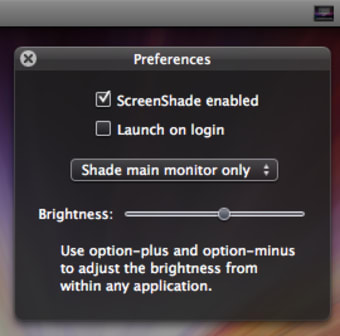
Best is probably to open preferences and set brightness yourself, via the little slider. You'll see you can also select what areas to shade.

ScreenShade also works very well with two simple shortcuts: Option with plus or minus to adjust it yourself.

More powerful than the brightness controls in your Mac, ScreenShade is good to have around if you work in poor lighting conditions.


Pros
  • Powerful dimming
Cons
  • Brightness in Mac works fine
Free Download ScreenShade 1.3

ScreenShade is virus free

We have analyzed the latest version of ScreenShade with 30 antivirus engines and it is virus free. See analysis results.

TESTED VIRUS FREE - Softonic GUARANTEED

Developer's description

ScreenShade is a tool for further dimming a screen (or screens) past the capabilities of the OS X brightness display settings. This utility is especially useful for people who find themselves using their computer in a low-lighting situation.

Even on its lowest native brightness setting, my MacBook Pro's screen is still extremely bright when used in a dark room - ScreenShade to the rescue!

ScreenShade (1) User reviews

  • Excellent
  • 10/10
  • rwb rwb
    User reviews
    1
    • Excellent
    • 9/10
    A Handy Utility

    It's a mystery why Apple insists on us having eye-searingly bright displays by default, in these days of being supposedly eco-friendly. Our iMacs default to full brightness at all times, and the... More

    • Review of ScreenShade - 24 Dec 2009
      This review is liked by 7 of 7
Your avatar
Review
  1. Maximum: 75 characters

  2. See example

Pros and Cons
Rate
  1. What rating would you give ScreenShade?

    You need to fill in all fields

    • Usability:

      Not rated
    • Stability:

      Not rated
    • Installation:

      Not rated
    • Functionality:

      Not rated
    • Appearance:

      Not rated
    • Overall rating:

      Not rated
  2. Don't worry, we won't make your email address public.

You're not allowed to share serial numbers, cracks, etc. or link to pages that contain them. If you do, your user account will be deleted, your IP address logged and legal action will be taken.

Get started - just ask a question!

Write a title for your question.

Alternativesto ScreenShade

  • In English:
    Butler
    Butler

    Customize and simplify your tasks

    Softonic rating:
    • 9/10
    User rating:
    • 8/10
  • Better rating:
    Winclone
    Winclone

    Clone your Boot Camp partition

    Softonic rating:
    • 9/10
    User rating:
    • 9/10
Compare with ScreenShade

Screenshots from ScreenShade

Download rank: Launchers & Desktop

8 of 63

Softonic rating:
  • Very good
  • 8/10
User rating: (2 ratings)
  • Excellent
  • 10/10
Your rating:
Your rating
  • 0

Review and rate this program

Blog posts about ScreenShade

More

Top Downloads: Launchers & Desktop

  • United States
  • Global

  1. Excellent multi-application launcher

Reviews of ScreenShade in other languages